What's changed in 2026
Chrome 146, released in March 2026, added native vertical tabs — you can now move the tab strip to a sidebar without any extension. That removes one reason to install a tab manager. What Chrome still does not do: save your tab groups across sessions, persist them through crashes, or let you name and restore them later. That gap is exactly what separates the extensions below from a browser setting toggle. We've also removed Cluster from this list — it was never updated from Manifest V2 and was disabled by Chrome during the MV2 phase-out. A replacement pick is added below.
How We Tested
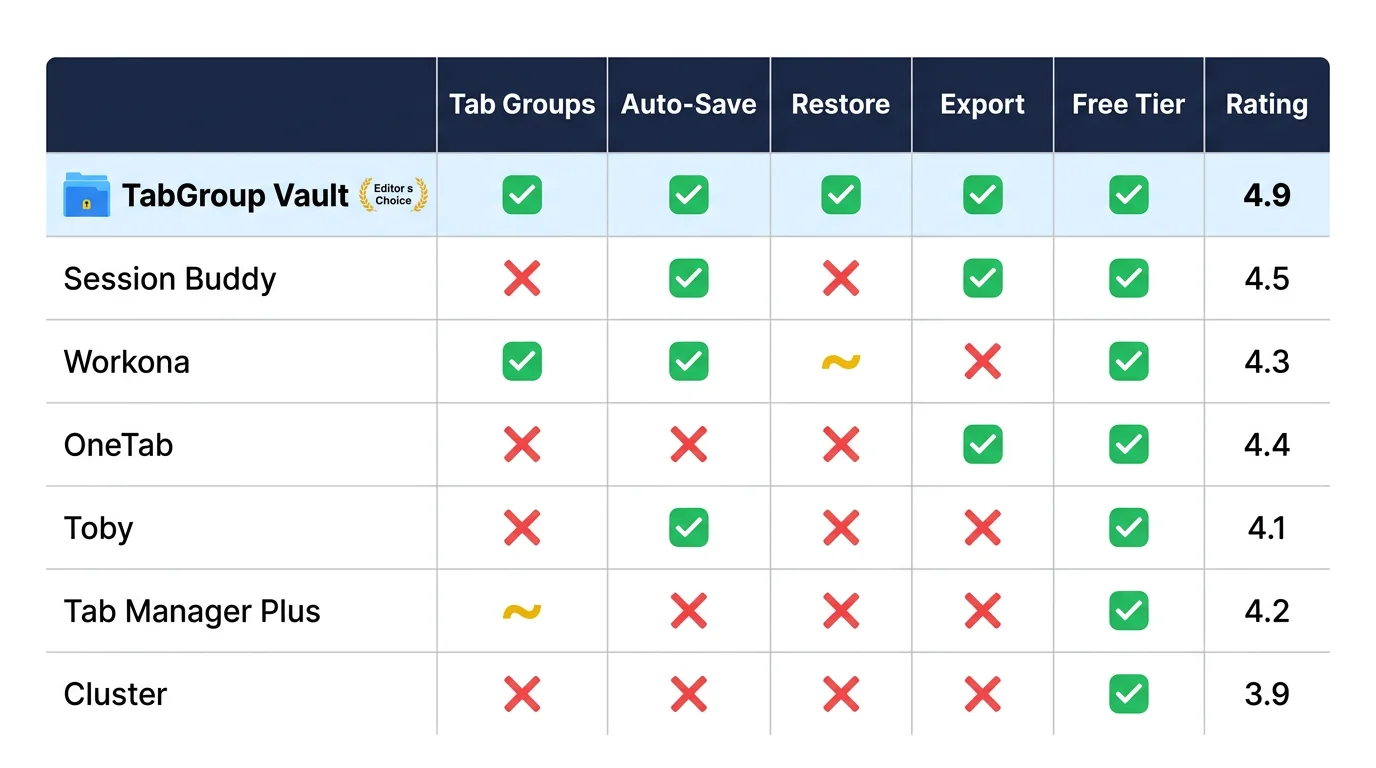
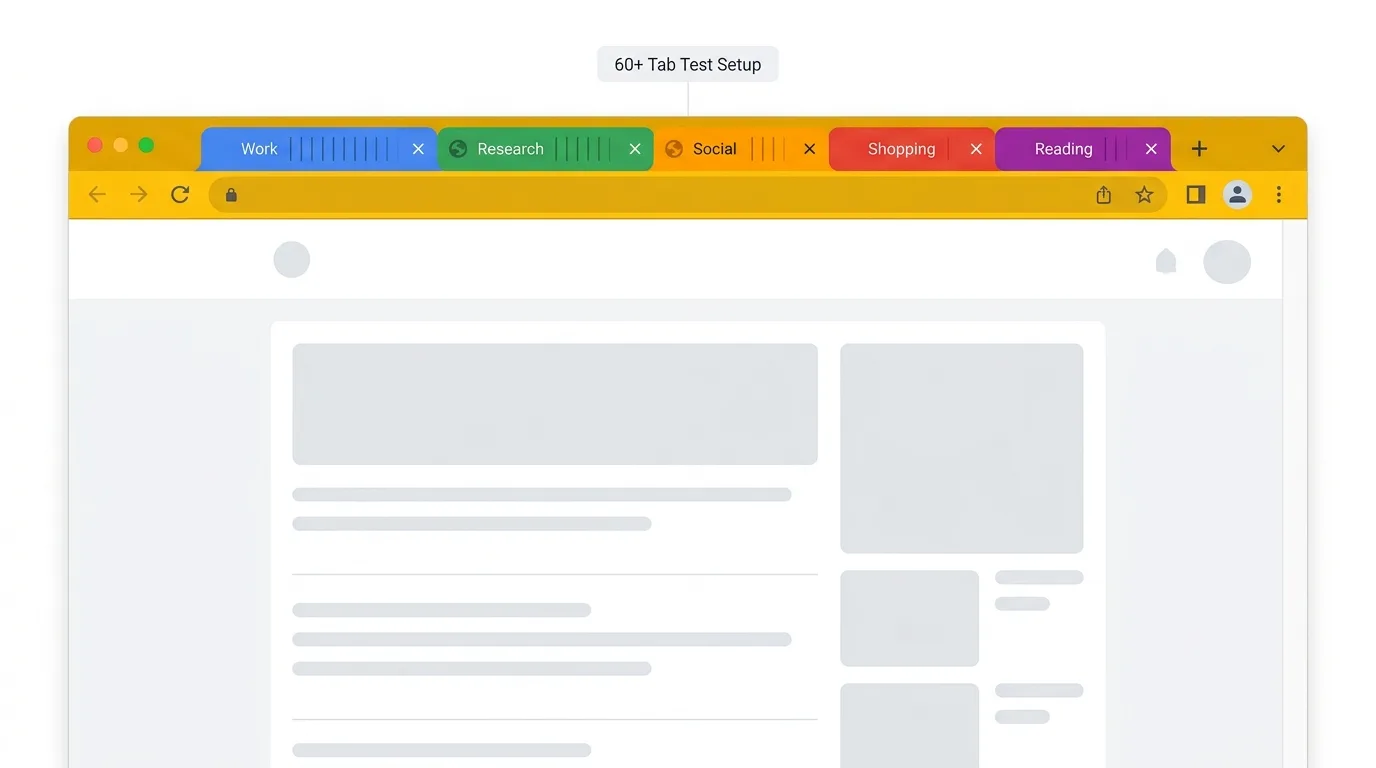
We installed each extension on a clean Chrome profile and used it as our primary tab manager for two full days. Our test scenario included 60+ open tabs organized into 5 Chrome tab groups across 2 windows. We tested each extension on four tasks: saving all tabs, restoring tabs, preserving tab group structure, and handling a simulated Chrome crash.
We also evaluated install size, permissions requested, user interface quality, and pricing. Here are our results, ranked by overall effectiveness for the typical Chrome power user.
1. TabGroup Vault - Best for Tab Group Users
TabGroup Vault takes first place because it solves the problem Chrome still does not handle well: making tab groups permanent. One click saves all your tab groups as a snapshot, preserving group names, colors, tab order, and URLs. One click restores them exactly.
In our crash test, we force-quit Chrome and reopened it. Chrome's native session restore recovered most tabs but scrambled the tab groups. TabGroup Vault's snapshot restored everything, including two collapsed groups that Chrome had expanded incorrectly.
Pros
- Full tab group preservation (names, colors, order)
- One-click save and restore
- Auto-save in Pro version
- Clean, minimal interface
- One-time $29 price (no subscription)
Cons
- Free tier limited to 5 snapshots
- Chrome-only (no Firefox or Edge version)
- Focused specifically on tab groups, not a general session manager
TabGroup Vault
Rating: 9/10
Price: Free (5 snapshots) / $29 lifetime Pro
Best for: Anyone who uses Chrome tab groups and wants them to persist reliably
2. Session Buddy - Best for Full Session Backup
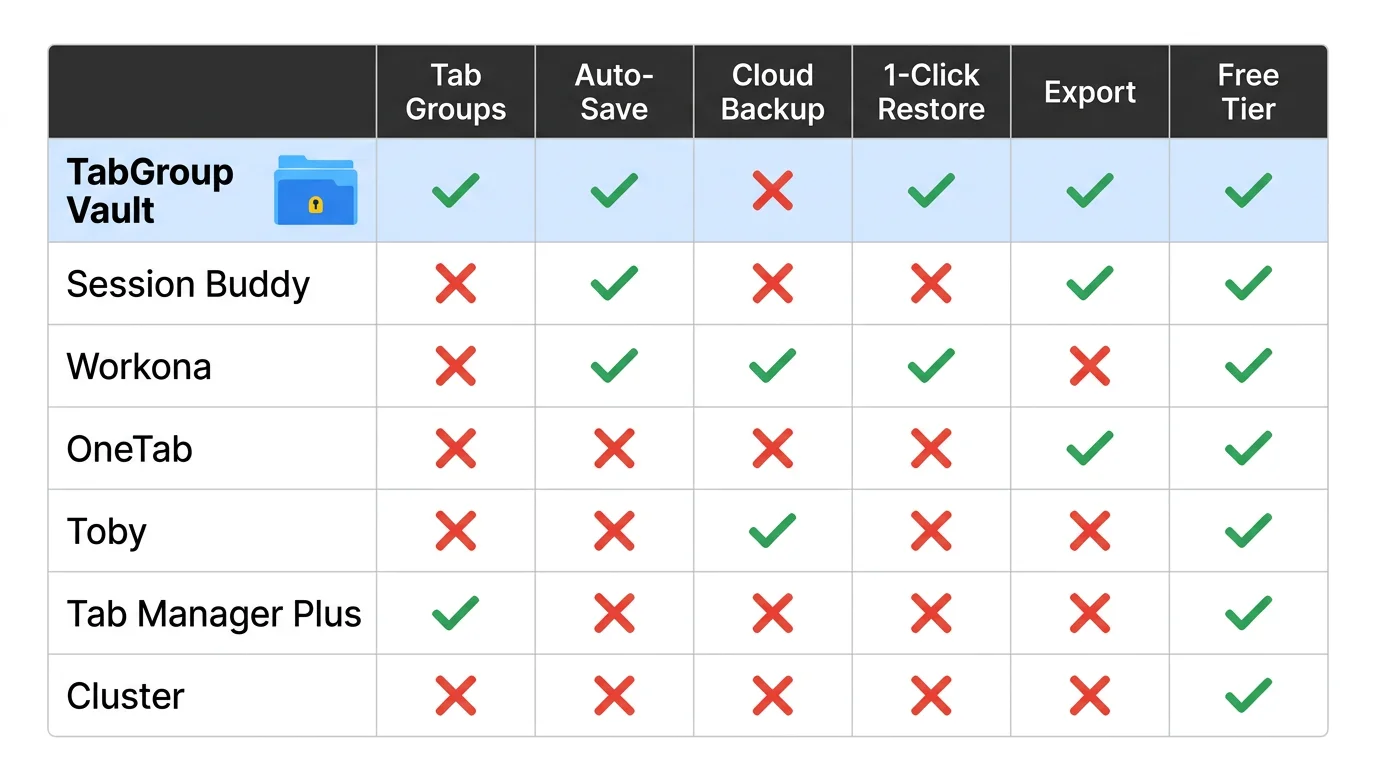
Session Buddy is the most thorough session saver we tested. It captures every open window with all tabs and lets you name, search, and restore sessions. The interface shows a hierarchical view of windows and tabs that makes it easy to find specific pages.
The main limitation is that Session Buddy does not preserve Chrome tab groups. When you restore a session, all tabs come back as ungrouped tabs in the correct windows. If you spent time organizing tabs into groups, you lose that structure.
Pros
- Comprehensive session saving
- Searchable session history
- Free with optional donation
- Reliable and well-maintained
Cons
- Does not preserve tab group structure
- Interface can feel cluttered with many sessions
- No auto-save feature
3. Workona - Best for Teams and Workspaces
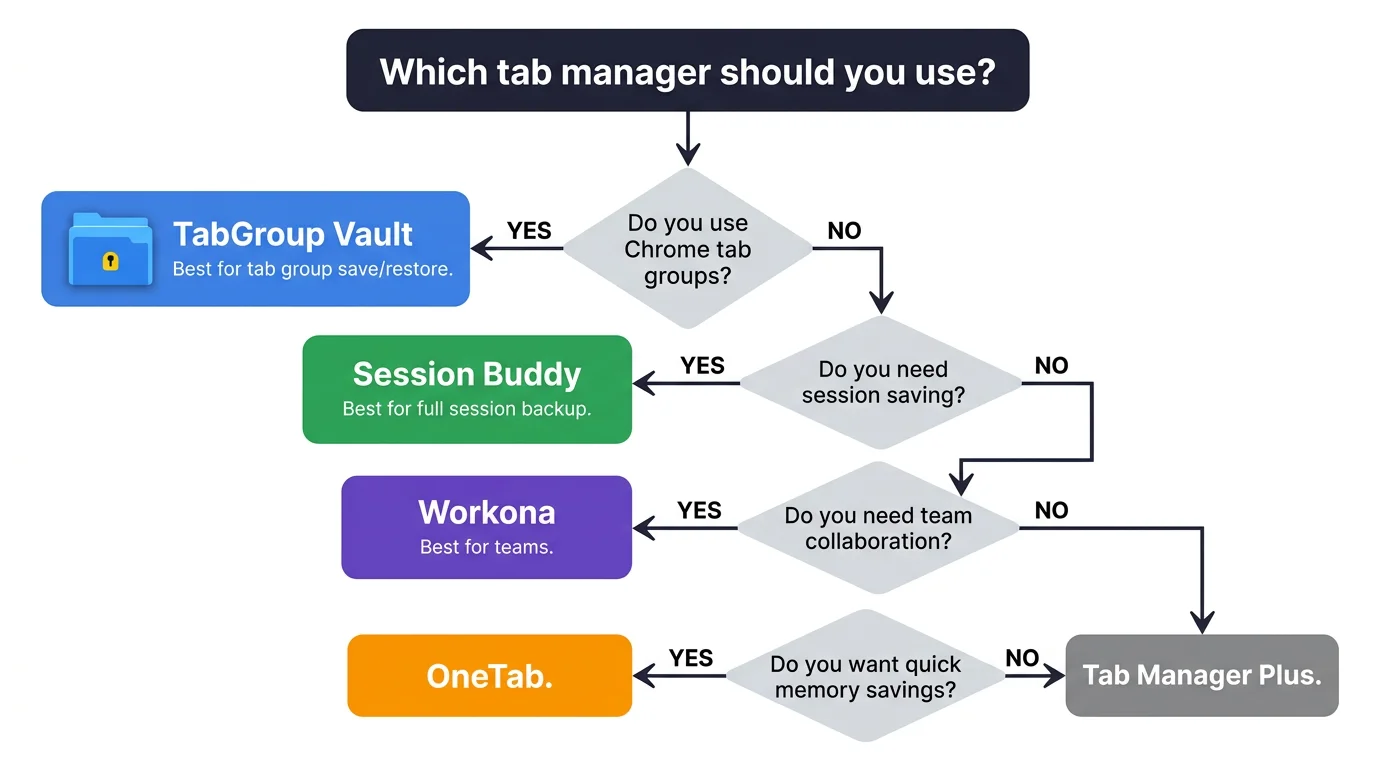
Workona is the most ambitious extension on this list. It creates its own workspace system on top of Chrome, letting you organize tabs, documents, and links into named workspaces. Switching workspaces opens the right set of tabs and hides the rest. Workona has over 200,000 users and a 4.6 rating on the Chrome Web Store, making it the most widely installed paid option on this list.
The downside is the monthly cost and the fact that Workona runs parallel to Chrome's native tab groups rather than enhancing them. You manage tabs in two systems, which adds friction.
Pros
- Full workspace management
- Team sharing features
- Document and link integration
- Polished interface
Cons
- $8/month for Pro features
- Parallel system to Chrome tab groups
- Steeper learning curve
- $288 over 3 years vs $29 for TabGroup Vault
4. OneTab - Best for Quick Memory Savings
OneTab does one thing well: it collapses all your tabs into a single page of links, freeing up memory instantly. You can restore tabs individually or all at once. It is fast, simple, and requires no configuration.
The trade-off is that OneTab does not organize anything. It creates a flat list in the order tabs were open. Tab groups, tab positions, and any structure you had are gone. It is a memory tool, not an organizer.
Pros
- Instant memory reduction
- Dead simple to use
- Completely free
- Very lightweight
Cons
- No tab group support
- Flat list only
- Outdated interface
- No auto-save or scheduling
5. Toby - Best for Visual Organizers
Toby replaces your new tab page with a visual dashboard. You drag tabs into named collections that appear as cards. It looks polished and works well for people who think visually about their tab organization.
Pros
- Beautiful visual interface
- Drag-and-drop organization
- Team features available
Cons
- Replaces your new tab page
- No Chrome tab group integration
- $4.99/month for Pro
6. Tab Manager Plus - Best for Tab Search
Tab Manager Plus provides a popup that lists all open tabs with a search bar. It is the fastest way to find a specific tab when you have dozens open. It does not save or organize tabs, but it solves the navigation problem effectively.
Pros
- Fast tab search
- Shows tabs across all windows
- Free and lightweight
Cons
- No save or restore functionality
- No tab group support
- Search only, no organization
7. Nest - Best Free Option with Auto-Backup
Nest is the most notable new arrival in 2026. It provides automatic session backup in the background — if Chrome crashes or you reboot, one click recovers your tabs. It also adds tab snoozing, per-tab notes, and a basic search across open tabs. Unlike Workona, it is entirely free with no paywall.
Nest does not preserve Chrome tab groups: restored sessions come back as flat windows. It also adds an AI chat sidebar that not everyone will want. But as a free crash-recovery safety net for users who don't need group preservation, it is a solid pick.
Pros
- Automatic session backup (runs silently in background)
- Tab snooze and notes
- Completely free
- Actively maintained in 2026
Cons
- No Chrome tab group support
- AI sidebar feels bloated if you only want session backup
- Newer extension — smaller track record than Session Buddy
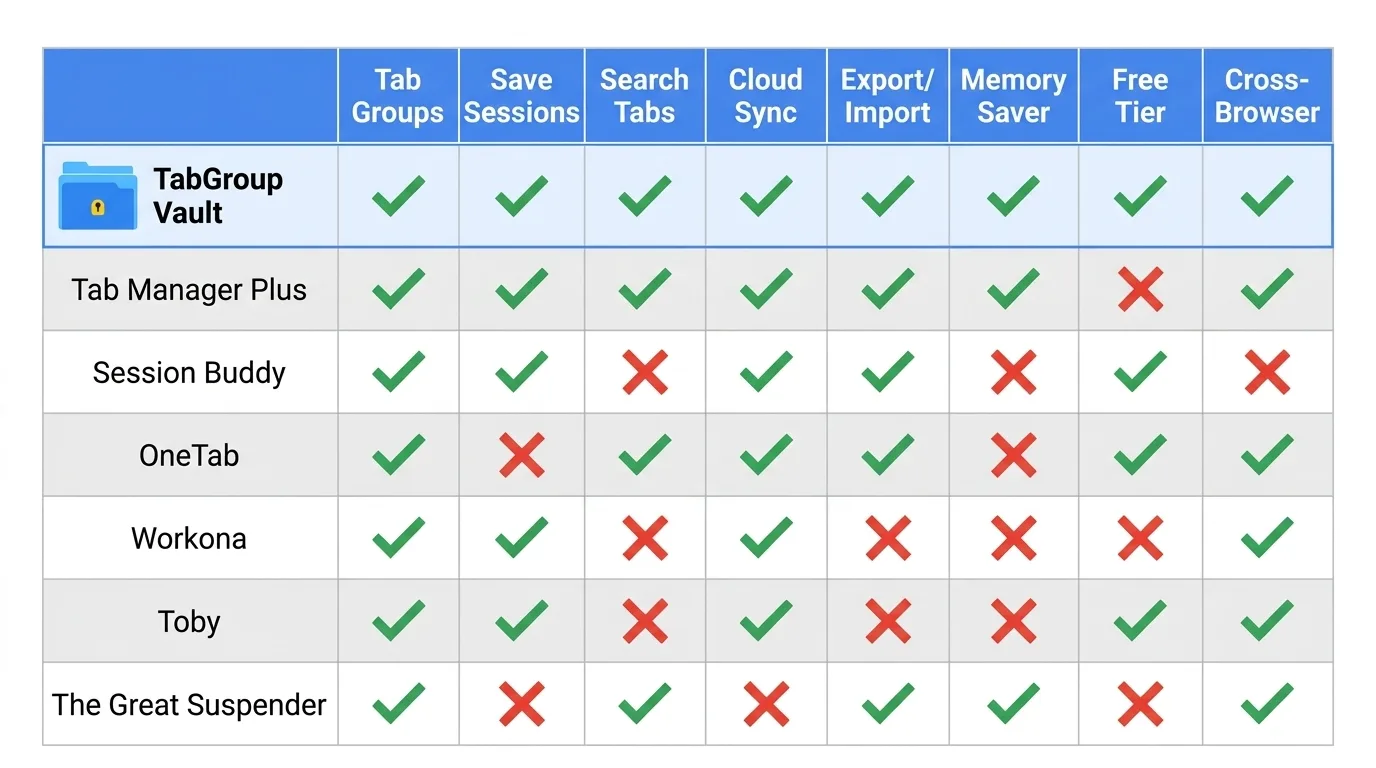
Overall Comparison
| Extension | Tab Groups | Save/Restore | Price | Rating |
|---|---|---|---|---|
| TabGroup Vault | Full support | Yes | Free / $29 | 9/10 |
| Session Buddy | No | Yes | Free | 8/10 |
| Workona | Own system | Yes | Free / $8/mo | 8/10 |
| OneTab | No | Partial | Free | 7/10 |
| Toby | No | Yes | Free / $5/mo | 7/10 |
| Tab Manager Plus | No | No | Free | 6/10 |
| Nest | No | Auto-backup | Free | 7/10 |
The Verdict
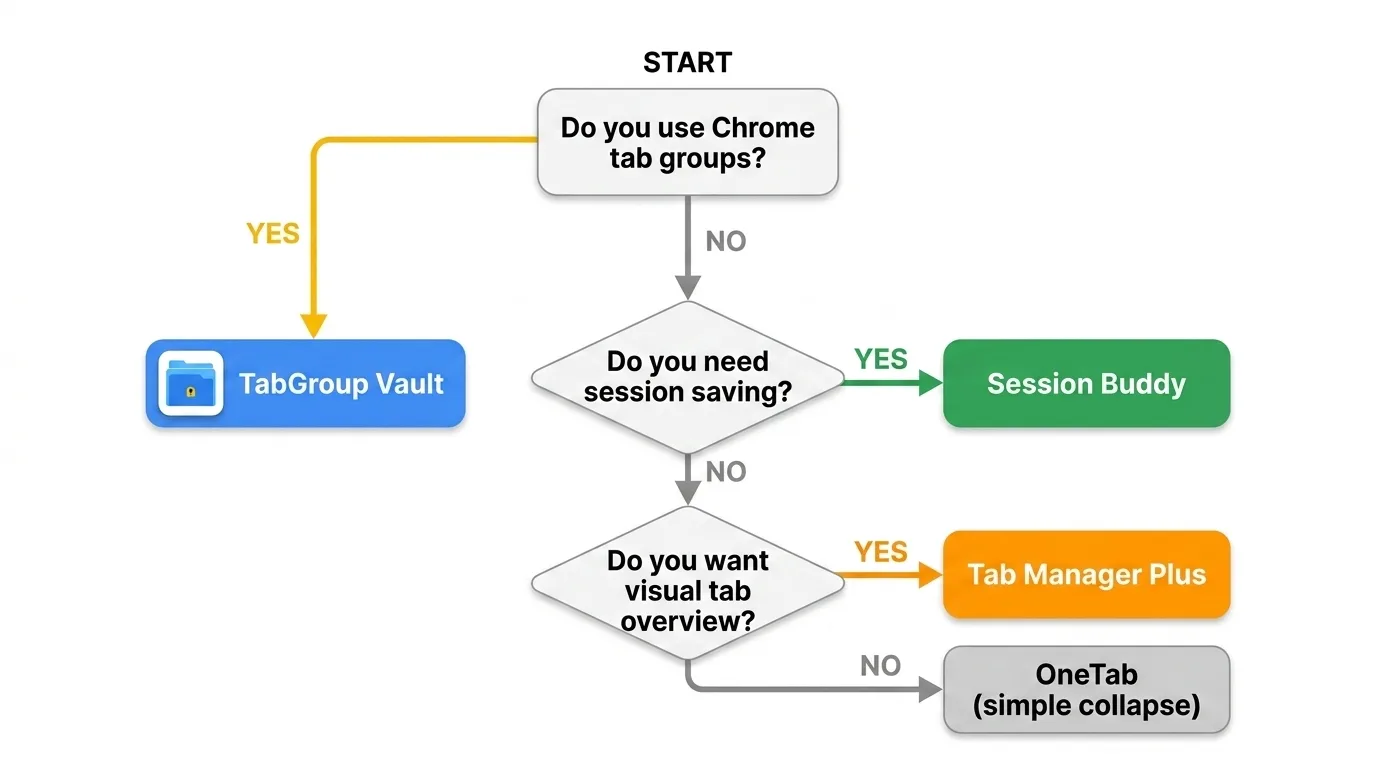
If you use Chrome tab groups, TabGroup Vault is the best tab manager available. It is the only extension that preserves the full tab group experience at a one-time cost that pays for itself the first time it saves you from a crash.
If you do not use tab groups and want comprehensive session management, Session Buddy is the best free option. For teams and workspace-heavy workflows, Workona delivers the most features but at a higher ongoing cost.
For a broader look at all the tab organizer options available, see our comparison of 10 Chrome tab organizer extensions. For tips on building a system around whatever tool you choose, check out our definitive guide to organizing Chrome tabs.